The Case for Data Visualization in K12 Education
It’s no surprise that I’m a big fan of data visualization, I literally have a poster of chart types on my wall. Data visualization can be beautiful, and effectively tell a story in a way that words don’t always do. But even more than that, it’s a helpful and quick way to quickly give context and uncover blind spots. But often data visualization, and basic exploratory data analysis, is skipped in the data digs in the education space. Let’s walk through why that’s a mistake, and why it should be an essential step in your data analysis process.
Data Visualization Can Improve Decision Making
Visualizing your data can help you improve your decision making, and make high quality decisions quicker. Meta-analysis by Eberhard (2023) finds a few benefits of data visualization on decision quality. First, it improves data decision quality and accuracy. You simply make more accurate decisions when visualizing your data. It also increases the speed of decision making. So even though it takes time to visualize your data, it leads to better quality and quicker decisions.
Visualize to Uncover Blind Spots in Education Data
It can be easy to look at a dataset, or even make your calculations, and come to quick conclusions. But doing so without visualizing your data can leave you at risk of missing something. In 1973 statistician Francis Anscombe’s developed four datasets (Anscombe’s quartet) that all have nearly identical summary statistics. If you calculated the mean, median, or variance you would be caught thinking the data is nearly the same. But by simply graphing the data sets you see that this isn’t really the case. An even more fun modern example, the datasaurus dozen, does something similar that can result in a star, circle, or dinosaur depending on the data set.

Let’s think about this with your education data. Consider you’re a district administrator and trying to understand the difference in assessment data from four different schools. You download the dataset and quickly calculate the means and standard deviations:
| School | Mean | Standard Deviation |
| Alexander | 71.94 | 13.32 |
| Bell | 72.01 | 13.54 |
| Clarke | 71.91 | 13.42 |
| Dixon | 72.01 | 13.50 |
Without looking any further you would think that each school’s data looks pretty similar, there certainly aren’t any statistically significant differences. It certainly appears like everyone is just about the same. A deeper look, however, reveals significant differences. Let’s visualize these distributions real quick as histograms.
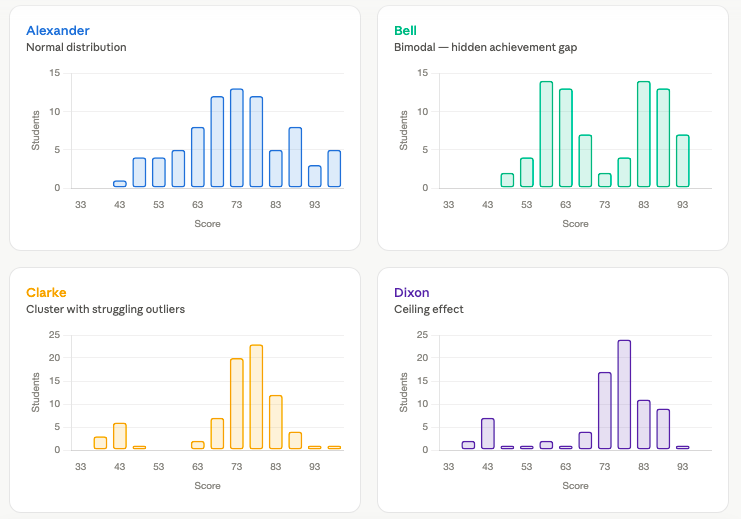
This tells a much different story. Alexander has a pretty typical distribution of students, where the others do not. Bell looks like you have two different groupings on higher and lower achieving students, where Clarke and Dixon have outliers that are pulling down the overall achievement. Each of these speak to different needs and different students who need targeting for support. If you’d skipped the visualization step, you would miss out on some critical information.
Putting it Into Action
There are lots of great tools available to help create data visualizations easily, free tools like DataWrapper, RawGraphs, and Flourish. Or you can use Excel or other simple tools to create basic visualizations. But it’s important to start, and incorporate data visualizations into your analysis process.
Feeling confident in your data analysis process starts with understanding your data literacy competencies. You can assess your data literacy skills with our free research based Data Leader Self-Assessment. Get a customized report, and learn how you can improve your data skills today!